

Modern Web Weekly #83
Chromium-based browsers already had support, but now that Firefox 160 joins the party, more PWAs will be able to do on-device speech recognition. This means recognition will be done by a local model and no internet connection is needed.
To use on-device speech recognition, a language pack for the language you want to recognize needs to be downloaded first using the .install() static method:
SpeechRecognition.install({
  langs: ["en-US"],
  processLocally: true,
  quality: "dictation",
})
The specs don’t list the processLocally key as an option for install() and MDN doesn’t either, but they do include it in the example.
When testing, I noticed Firefox doesn’t need it, but Chrome fails to install any language packs without processLocally set to true, so for now at least, you should include it when calling install(). Since this is basically redundant, I expect this to change in future versions of Chrome.
To use a locally installed language pack for on-device recognition, set processLocally to true and call start():
const recognition = new SpeechRecognition();
recognition.processLocally = true;

// the local model will now be used for
// on-device recognition
recognition.start();
The install() method takes an optional quality key in its options, which specifies the use-case of your app and the required complexity of the language pack. It can take three values:
command(default): short phrases with limited vocabulary and a single speaker. Use cases include voice commands for appsdictation: continuous speech with moderate background noise and a single primary speaker. Use cases include dictating long-form text for text messages, emails, or translationconversation: continuous speech with complex vocabulary, high background noise tolerance, and multiple speakers. Use cases include transcribing meetings and live captioning
To check if a language pack is available for download, call the available() method:
const recognition = new SpeechRecognition();
const availability = await recognition.available({
  langs: ["en-US"],
  processLocally: true,
  quality: "dictation",
});
available() returns a Promise that resolves to any of the following values:
‘available’: all specified language packs are available at the specified quality level for download (processLocallyset totrue) or either for download or remotely (processLocallyset tofalse)‘unavailable’: at least one of the specified language packs is not available at the specified quality level for download (processLocallyset totrue) or not for download or remotely (processLocallyset tofalse)‘downloading’: at least one of the specified language packs is being downloaded for on-device recognition (only relevant whenprocessLocallyset totrue)‘downloadable’: at least one of the specified language packs has not yet been downloaded for on-device recognition (only relevant whenprocessLocallyset totrue)
Check the demo where you can download language packs when supported in your browser. Go offline and then try the on-device recognition for downloaded languages.
Icon-only mode for <camera>, <microphone> and <geolocation> in Chrome 157
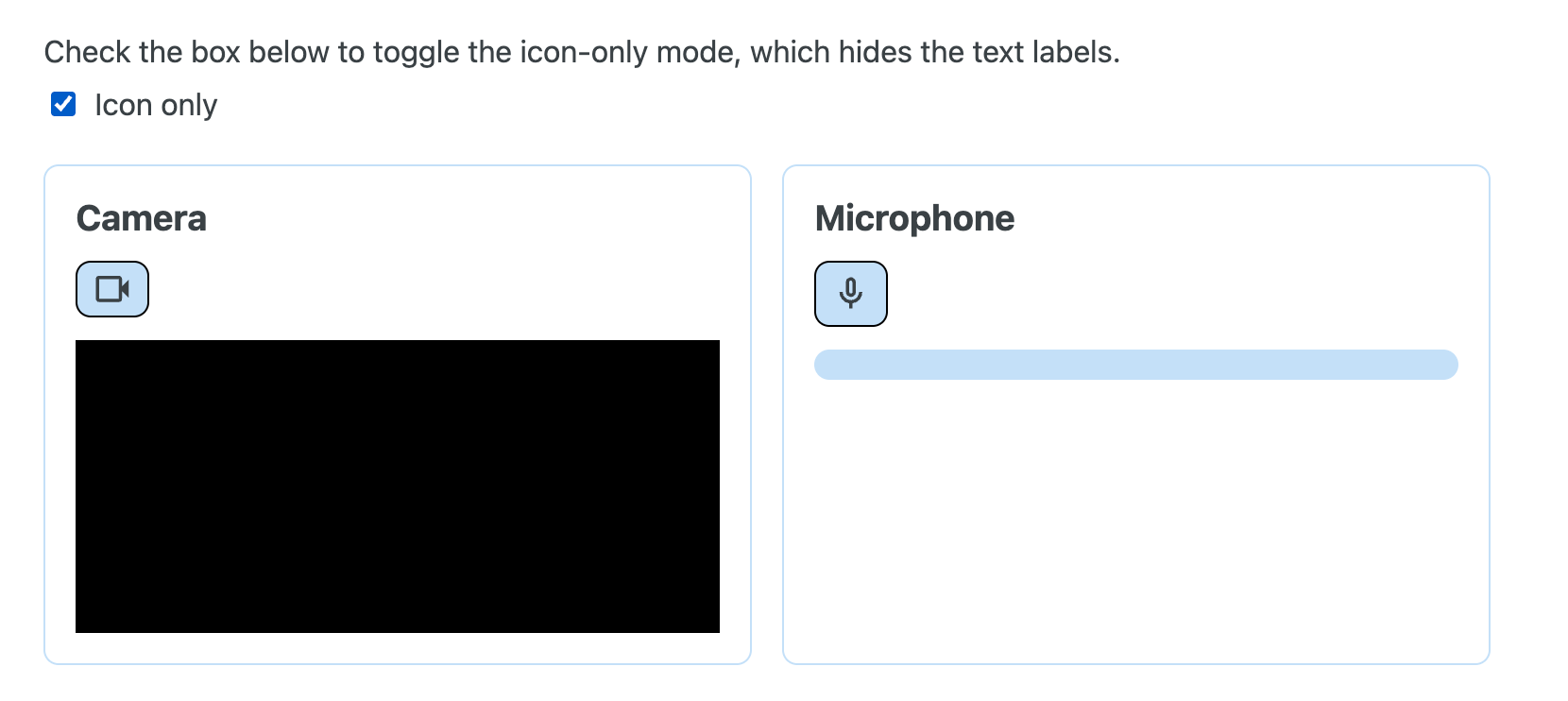
The declarative media capability elements <camera> and <microphone> and the <geolocation> element now support the icon-only display mode, which means the element consists of only an icon without any explanatory text:
<camera displaymode="icon-only"></camera>
<microphone displaymode="icon-only"></microphone>
<geolocation displaymode="icon-only"></geolocation>
This makes it easier for web apps to include these elements as buttons in a button group for example.
Firefox 159 on Windows can now receive push notifications when closed
If you’re one of the lucky ones (like me!), you can already receive push notifications through Firefox 159 on Windows when the app is not running.
Don’t worry if you can’t yet, this change is being rolled out gradually so eventually it will work on your machine as well.
You can test this using the push notifications demo. Send yourself a push notification with a 5-second delay that gives you the time to close Firefox and watch it be delivered in all its glory (okay, I’m getting carried away here…)
You can also check Windows Task Manager to see if you can find a process called notification-helper.exe, which is the file that makes all this possible.
No support for other platforms has been announced yet, but I’ll keep you informed as always.
Ship A PWA Users Can Trust
When you deploy a new version of your PWA, you want to have the confidence that it doesn't quietly break offline support, serve stale files, or leave the service worker stuck somewhere in its lifecycle.
The PWA Runtime Audit finds runtime failures under real-world conditions, before your users do.
It checks if your PWA:
is configured correctly
is installable
works offline after an update
works after a cold start while offline
goes correctly through the service worker lifecycle
serves the correct cached content while offline
retries requests made offline when back online
receives push notifications
Integrate it as part of your CI/CD pipeline so in case something breaks, you get a clear report showing what broke, why it broke, and what to fix first.
Ship a PWA your users can trust.

Streaming HTML now supported in Chrome 157
I already announced this in Modern Web Weekly #74, but streaming HTML is now supported by default in Chrome 157 💪
And when I say “streaming HTML”, I really mean out-of-order streaming HTML, which means you can choose the order in which the HTML parts are delivered, regardless of their order in the source document
Imagine your web app has a large dropdown menu at the top of the page. Since HTML is delivered in a top-to-bottom fashion, the HTML after this menu won’t be available until the HTML for the menu is downloaded and parsed, but the user won’t be able to use the menu until the page becomes interactive. The menu HTML might as well be delivered later so the rest of the page is available sooner.
Or how about a single-page app with a page shell. This shell is delivered in the first request, and then JavaScript is needed to plug in all other HTML.
Now, you can do this in one request. You send the HTML that renders the page shell first, then the content needed for it, and the browser automatically renders the HTML in the right place, without any JavaScript.
Out-of-order streaming HTML
There have already been some experiments with out-of-order streaming HTML that use Declarative Shadow DOM and <slot> elements to stream HTML out of order:
<div>
  <template shadowrootmode=”open”>
    <header>Header</header>
    <main>
      <slot name=”content”></slot>
    </main>
    <footer>Footer</footer>
  </template>

  <div slot=”content”>
    This div will be rendered inside the slot above without JavaScript.
  </div>
</div>
In the above example, <slot name=”content”></slot> will be replaced with <div slot=”content”> as soon as it’s available in the browser, without any JavaScript.
This is a very neat feature, but it only works with Shadow DOM.
In Chrome 157, you can now use Declarative Partial Updates that enable web apps to stream HTML into parts of the document, regardless of the order in which it’s delivered by the server.
For example, web apps can now download the most important HTML first, even when this is not at the top of the HTML document.
How it works
Streaming out-of-order HTML is called “patching”. It means you can interleave content for multiple locations in an HTML document in one HTML stream, and the content doesn’t have to be streamed in the order in which it’s located in the document, hence “out-of-order streaming”.
It works by putting processing instructions in an HTML document that function as the insertion points where the content will be streamed into:
<div>
  <?marker name=”content”>
</div>

<template for=”content”>
  <p>Here is the content that will be inserted.</p>
</template>
In the above example, the processing instruction <?marker name=”content”> will be replaced with the contents of the <template>.
The template will look up the processing instruction with a name attribute that corresponds to its for attribute and replace it with its contents.
The above example will end up like this:
<div>
  <p>Here is the content that will be inserted.</p>
</div>
In addition to <?marker>, you can also use the <?start> and <?end> markers that enable you to add temporary content that will be displayed until it’s replaced with the contents of the corresponding <template> element:
<div>
  <?start name=”list”>
  Loading…
  <?end>
</div>

...

<template for=”list”>
  <ul>
    <li>Item 1</li>
    <li>Item 2</li>
    <li>Item 3</li>
  </ul>
</template>
In this example, “Loading…” is displayed inside the <div> until it’s replaced with the list inside the <template> element.
This would enable you to first stream a skeleton HTML page with a loading screen, and after that you could append the list HTML, which is maybe fetched from an external API that takes longer to load.
Normally, you would first serve the app shell, then fetch the list with the API data in a separate request, and then use JavaScript to insert the list HTML. With patching, you can do everything in a single HTML response without having to use JavaScript to insert the list.
You can even add processing instructions in the templates to enable updates in multiple steps. Imagine that the list in the previous example is loaded in chunks instead of fully in one request. By including processing instructions in the templates, you can now continuously update the list:
<div>
  <?start name=”list”>
  Loading…
  <?end>
</div>

...

<template for=”list”>
  <ul>
    <li>Item 1</li>
    <?marker name=”items”>
  </ul>
</template>

<template for=”items”>
  <li>Item 2</li>
  <li>Item 3</li>
  <?marker name=”items”>
</template>

<template for=”items”>
  <li>Item 4</li>
  <?marker name=”items”>
</template>
This results in the following HTML:
<div>
  <ul>
    <li>Item 1</li>
    <li>Item 2</li>
    <li>Item 3</li>
    <li>Item 4</li>
    <?marker name=”items”>
  </ul>
</div>
This is huuuuge…
…and there’s even more…
Streaming HTML in single-page apps
Single-page apps (SPA) have long been the solution to make web apps feel like real apps, because they only update the changed content when the user navigates to another page, without a full page reload.
The downside of this is that SPAs can’t use the browser’s streaming parser. When a browser loads a web page, it can do so in a streaming fashion. This means that it can already start rendering the page while it’s still downloading; it doesn’t have to wait for the page to be fully loaded before it can start rendering content.
SPAs typically load a skeleton HTML page and then update the content with DOM manipulation using JavaScript. Any content that is inserted into the DOM after the page has been served by the server cannot use the browser’s streaming parser. It has to wait for all content to be ready before it can start to render it when it’s inserted using JavaScript (for example, with innerHTML).
Until now…
New streaming methods
In addition to existing methods like setHTML, setHTMLUnsafe and the innerHTMLand outerHTML setters, this proposal adds streaming methods like streamHTML, streamHTMLUnsafe, streamAppendHTML etc.
This enables SPAs to stream HTML into the insertion points marked by processing instructions using JavaScript. This means that instead of using innerHTML to update content, your SPA can now do this:
const response = await fetch(’/path/to/content.html’);
const html = await response.text();

const writer = document.body.streamAppendHTMLUnsafe().getWriter();

await writer.write(html);
await writer.close();
Note that in this example, the content is added to the <body> element.
When you use <template> elements and markers, you don’t even need to get a reference to the insertion point with JavaScript anymore. You can just define the insertion point of the SPA content with a marker:
<main id=”app”>
  <section class=”page”>
    <?marker name=”content”>
  </section>
</main>
And then you can simply append the <template> to the bottom of the page:
<template for=”content”>
<?start name=”content”>
  <p>Homepage content</p>
<?end>
</template>
Since you defined a marker and added this template to the bottom of the page, the browser will now take care of inserting the content in the right place. Also note that this template contains <?start> and <?end> markers, and the resulting HTML will be this:
<main id=”app”>
  <section class=”page”>
    <?start name=”content”>
      <p>Homepage content</p>
    <?end>
  </section>
</main>
This ensures that the processing instructions are ready for when the user navigates to another page. If each partial contains these processing instructions, you can always just add the page HTML to the bottom of the page, and the browser will then insert it in the right location while replacing the contents of the previous page.
And there’s even more good news…
Cross-browser support is coming soon
Not only can you already use this in Chromium-based browsers from version 148 with experimental web features enabled, but the WebKit team (Safari) has announced they will support this and the Firefox team has a positive position on this feature.
This means this feature could be supported in all major browsers soon! 💪
Demo
I created a demo SPA that uses the technique described above to update the page content. It defines markers in the HTML where the page content is to be inserted, and each page partial HTML template contains new markers where the content of the next page is to be inserted. All page templates are simply added to the bottom of the page, and the browser takes care of the rest.
Check out the demo and the source code.
Notice that the demo uses the streamAppendHTMLUnsafe() method to stream the content. The Unsafe variant is required to preserve the <template> element in the HTML that is inserted. Using streamAppendHTML()results in empty HTML and doesn’t work.
Also notice that the streaming methods are required to use templates and markers. When you use non-streaming methods, like appendHTMLUnsafe() for example, the parent of the template when it is parsed is an intermediate document fragment, and the patching happens “in place” inside the fragment instead of in the insertion point indicated by the markers.
The /list route of the demo demonstrates a list that is updated in chunks. The demo just uses setTimeout() to simulate a response that delivers the chunks, but you can probably imagine how this would work in a production scenario where the content is delivered in real chunks.
Also make sure to check out the Chrome developers article and the accompanying demo, which demonstrates the out-of-order streaming very well.
This is a very promising feature that will truly revolutionize how HTML is delivered. When more browsers support this, you will hear it here first!