
Modern Web Weekly #67
The modern web, tested and explain in plain English

A declarative install element
In Modern Web Weekly #65 and #59, I wrote about the Web Install API (now stable in Chrome 144!) that adds the install method to navigator and that enables web apps to be installed as PWAs, also from other domains.
Chrome 147 now also introduces an origin trial for the declarative <install> element for this.
At the time of writing, the original trial hasn’t been launched yet, but you can already enable it in Chrome 147 at chrome://flags/#web-app-installation-api
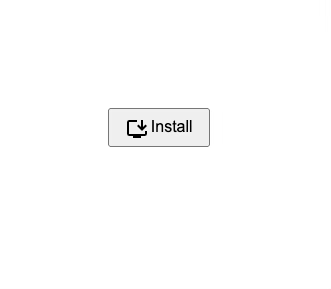
The declarative <install> renders a button. When the app is not installed, it will show and install icon and the text “Install”. When the app is installed, it will show a launch icon and the text “Launch”.
When used without attributes, it will install the current web app:
<install>
  [optional fallback content]
</install>
With the attributes installurl and manifestid, it can be used to install web apps from other domains:
<install installurl="https://whatpwacando.today/"
         manifestid="https://whatpwacando.today/pwa-today">
  [optional fallback content]
</install>
installurl specifies the URL of the web app to install. If unspecified, the current web app will be installed.
manifestid specifies the computed id of the web app to install. If unspecified, the manifest.json file of the web app at installurl must have a custom id defined. If specified, it must match the computed id of the web app to be installed. You can find the computed app ID of your web app in Chrome Devtools in the Application tab > Manifest > Identity.
When the web app to be installed, either the current one or another one specified by installurl, is not yet installed, the button looks like this:
After the app has been installed, it will look like this:
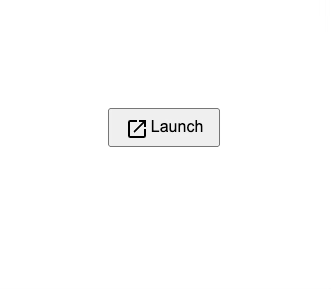
This makes it very easy for installed PWAs that are opened in a browser to indicate that it was already installed. This is especially nice for PWA app stores that offer functionality to install web apps on other domains. These can now automatically show a “Launch” button instead of an “Install” button.
Just like with the Web Install API, when the current web app is installed and it has screenshots defined in manifest.json, the install dialog will show the enhanced installation dialog. But when a web app at another domain is installed, it will show the simple installation dialog, even if that web app has screenshots defined in its manifest.json.
For the Web Install API, this will soon be fixed so I expect this to be the case for the install element as well.
As soon as the original trial is launched, I will register and you can view the demo of <install> at https://whatpwacando.today/installation in Chrome 147.
If you enable the flag at chrome://flags/#web-app-installation-api you can already view it right now.
How to make sure push notifications open your PWA on Android
I recently worked on a bug where an installed PWA was not opened when a push notification was sent to it and the user tapped it. Instead, the default browser was opened, despite the fact that the notificationclick event handler was correct.
Here’s a condensed version of the handler I use:
const notificationClickHandler = async (e) => {
  const {notification} = e;
  const {data} = notification;

  notification.close();

  e.waitUntil(clients.openWindow(data.url))
};
The notification property of NotificationEvent contains the data that was sent as part of the push notification in its data property. This in turn has a url property that points to the URL that must be opened in the PWA when it’s installed.
This worked fine on iOS but on Android, the URL was opened in the default brower instead of the PWA.
After examining, I found that the manifest.json file of the PWA didn’t have a scope member.
scope defines the top-level URL path that contains the web app’s pages and subdirectories. It effectively defines the scope of the service worker, in the sense that only URLs within the scope will be opened in the app, and any URLs outside it will be opened in the default browser or in-app browser when applicable.
The spec states that when scope is not defined, it will be set to the start_url value after removing its filename, query, and fragment, but on Android this apparently doesn’t apply when a push notification is clicked.
I always specify a scope out of habit so I wasn’t even aware of this issue, but this fixed the issue immediately.
Bottom line: always set scope in your manifest.json.
PWA Audit: on your way to a great PWA
Do you already have a PWA, but are you running into issues with performance, security, or functionality? Or are you not sure how to make your PWA better?
I can help you by running an audit of your PWA
I will evaluate it on more than 35 criteria and provide you with clear and actionable instructions on how to improve it. No generic stuff that you can get anywhere, but an in-depth quality checkup to get you on your way to a great PWA.
Some of the criteria I will evaluate it on are:
Installability
Cross-device and cross-platform compatibility
Offline support
Usability
Effective use of modern web APIs
Performance
Security
Your investment in the improvement of your PWA through the audit is €499, excluding VAT (where applicable).
If you want to request an audit or first would like to know more, you can
fill out the form or book a call with me.

The importance of keeping the service worker alive with event.waitUntil()
Another bug was reported to me this week that initially left me puzzled.
A user reported that the notifications demo of What PWA Can Do Today never showed a badge on the app icon when a push notification was received. This happened to him since iOS 17.4 on the same model iPhone I have myself.
My initial reply was that he probably had badges not enabled in the Notifications settings for the PWA:
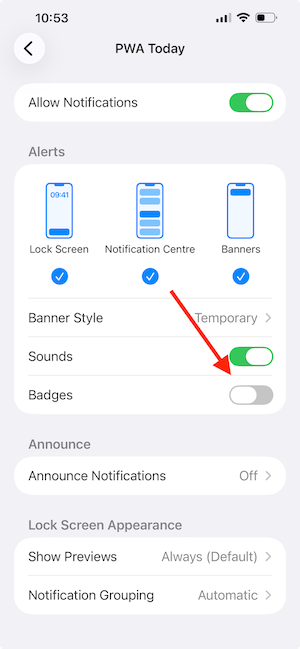
But this was not the case, so what was going on? Same device, same settings, same iOS version, yet it worked on my device but not his…
Some context first; the handler for the push event shows the notification and then updates the badge when the app is not running. It keeps a count of the unread messages in IndexedDB and when a new push notification arrives, it increments the number of unread notifications and shows the number with a call to navigator.setAppBadge(count).
I examined the whole flow multiple times and it consistently worked on my device so I didn’t know what was wrong. Until I took a closer look.
Here’s a condensed version of the handler for the push event:
const pushHandler = e => {
  e.waitUntil((async () => {
    const data = e.data.json();
    const { title, message, interaction, url } = data;

    const options = {
      body: message,
      icon: '/src/img/icons/icon-512x512.png',

      ...
    };

    await self.registration.showNotification(title, options);

    const activeClients = await hasActiveClients();
    if (!activeClients) {
      updateBadges();
    }
  })().catch(err => sendMessage(err)));
};
And this is the updateBadges function that updates the number of unread messages and shows the badge:
const updateBadges = async (inc = 1) => {
  const store = await openStore(IDBConfig.stores.badgeStore, 'readwrite');
  const result = await store.get('num') || {num: 'num', count: 0};
  const numBadges = result.count;
  const count = Math.max(0, numBadges + inc);

  await store.put({num: 'num', count});

  navigator.setAppBadge(count);
};
The updateBadges function uses e.waitUntil to make sure the service worker stays active until the Promise that it receives as its argument resolves.
Can you already guess where this is going?
Upon a closer look I realized I called updateBadges without await.
And updateBadges in turn called navigator.setAppBadge(count) without await as well!
So this could mean that the anonymous async function that was passed to e.waitUntil could resolve before updateBadges finished, causing the service worker to be terminated before the badge could be shown.
But it worked on my device without await!
Since the await really needed to be there in both places I added them and, lo and behold, it started working for the bug reporter. 💪
Here are the updated versions:
const pushHandler = e => {
  e.waitUntil((async () => {
    const data = e.data.json();
    const { title, message, interaction, url } = data;

    const options = {
      body: message,
      icon: '/src/img/icons/icon-512x512.png',

      ...
    };

    await self.registration.showNotification(title, options);

    const activeClients = await hasActiveClients();
    if (!activeClients) {
      await updateBadges(); // await added
    }
  })().catch(err => sendMessage(err)));
};
const updateBadges = async (inc = 1) => {
const store = await openStore(IDBConfig.stores.badgeStore, 'readwrite');
const result = await store.get('num') || {num: 'num', count: 0};
const numBadges = result.count;
const count = Math.max(0, numBadges + inc);
await store.put({num: 'num', count});
await navigator.setAppBadge(count); // await added
};Bottom line: in any event handler in the service worker that uses e.waitUntil (install, activate, push, sync, notificationclick), always make sure that the Promise doesn’t resolve untill all work is done.
Add await to all calls to async functions. If you are using .then with Promises, make sure to return them:
e.waitUntil(
  foo().then(() => {
    return bar();
  })
  .then(...)
);
I initially missed this because it worked without issues on my device, but service worker timing may differ between devices, so you can never guarantee that it will work properly unless you properly await or return Promises in e.waitUntil.